Some online tools do all their work inside your browser; others send what you type to a server or another company’s service. From the outside they look the same. Most Biberks tools work in your browser, but some download shared files from Biberks, a few older pages contact a named outside service, and some save preferences on your device. This page shows which is which, so you can decide what to enter.
Biberks is moving to a new version of the site (V2). Everything below describes V2, except the older pages still in use, which work differently.
The short version
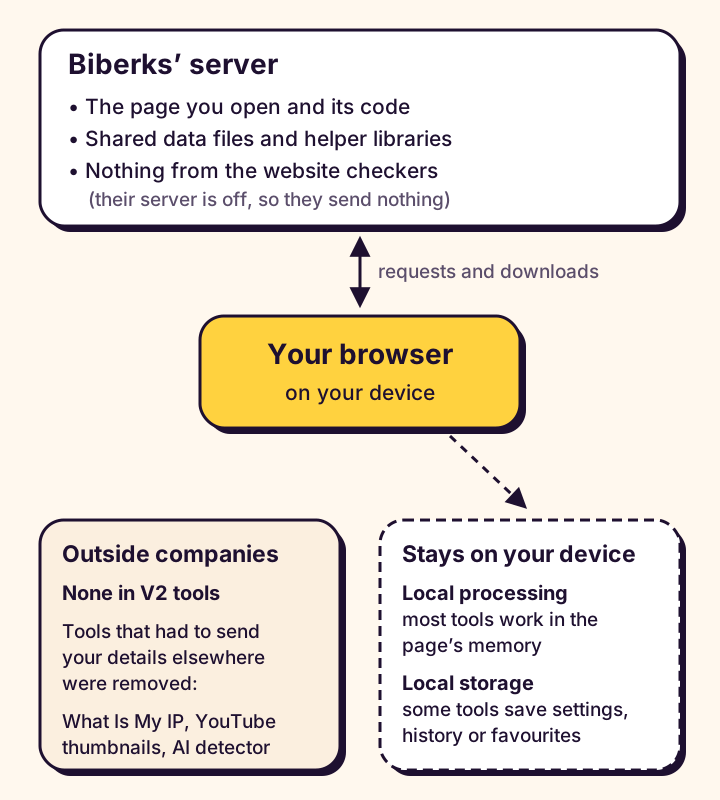
- In your browser. Most tools, such as the Password Generator and Image Converter, work on your device. What you enter isn’t sent to Biberks.
- Files from Biberks. Some tools download shared data or helper code from Biberks, such as the Baby Name Generator’s name list. These files contain nothing you entered.
- Other companies’ services. No V2 tool contacts one. What Is My IP and the YouTube Thumbnail Downloader, which had to, were removed.
- Saved on your device. Some tools keep settings, history or favourites in your browser’s local storage, such as the World Clock’s city list.
- Older pages. A few tools still run on the previous version, which shows ads and, for some tools, sends what you enter to a server.
- Ads. V2 pages show Google ads too; see Ads, analytics and cookies.
You can browse every tool on the all tools page.
How a web tool can handle your data
In your browser
Every Biberks page, and the JavaScript that makes its tool work, is delivered by Biberks’ web server, then runs on your own device. When a tool works in the browser, what you type, paste or open stays in the page’s memory, and the result is worked out there too.
Loading the page is an ordinary request to Biberks that doesn’t include anything you later enter. Closing or reloading the tab clears the page’s memory, unless the tool saved something on your device (see What Biberks saves on your device).
Files from Biberks’ own server
Some tools need more than their basic code. They download extra files from Biberks when they need them:
- Data files, such as the list of names for the Baby Name Generator, the keyword lists for the Resume Score Checker and the emoji list for Text to Emoji.
- Helper libraries, such as a PDF reader and a PDF maker, a ZIP maker, a QR code library and an Arabic font for documents.
These files are part of the website. They’re the same for everyone, nothing you’ve entered is added to the request, and the tool uses them in your browser. The helper libraries are hosted by Biberks, not another company’s network, and each is checked against a fingerprint (an integrity hash) before your browser runs it, so a changed file is refused. Fetching a file is still a request Biberks’ server sees.
Biberks’ own server doing the work
Some jobs can’t be done inside a browser. Reading another website’s page is one, because browsers stop a page reading other sites’ content unless those sites allow it. For a job like that, what you enter has to be sent to a server, which does the work and returns the result. No V2 tool does this: the website checkers that were built to work this way have been removed or changed.
Other companies’ services
On the review date, no V2 tool contacts another company’s service. The tools that had to, What Is My IP and the YouTube Thumbnail Downloader, were removed; below explains why. The older pages still in use do contact others.
What any server can see when your browser asks for something
Whenever your browser asks a server for something, whether a page, an image or a data file, the request itself tells that server a few things:
- Your IP address, which the reply has to be sent back to. A rough location can often be guessed from it.
- The address (URL) requested, including anything after a question mark in it.
- Details about your browser and device, such as the User-Agent header naming the browser and operating system.
- The time of the request and technical details of the connection.
A request can also carry a Referer header saying where it came from; between websites, browsers normally send only the first site’s address. Biberks’ requests for its own speed-test files send no referrer at all.
What HTTPS protects, and what it doesn’t
HTTPS encrypts what passes between your browser and a server, so others on the same network, such as a public Wi-Fi hotspot, can’t read or change it, including the full address and anything you send. It doesn’t hide what you send from the server that receives it, which decrypts it to answer, or which server you’re connecting to. HTTPS protects the journey, not the destination.
Tools that work entirely in your browser
These tools need nothing more from Biberks once the page, its code and any helper files have loaded.
Password Generator
The Password Generator creates passwords on your device using your browser’s built-in cryptography (the Web Crypto API). Passwords are never sent to Biberks or saved: close the tab and they’re gone. Your settings, such as length and character types, are remembered on this device. A copied password may stay on your clipboard until you copy something else. For advice on choosing and keeping passwords, see how to choose strong passwords.
Image Converter
The Image Converter converts your images inside your browser; they’re never uploaded, and the converted copies leave out location and camera data. It downloads two things from Biberks, and only when they’re needed: its ZIP helper, when you convert two or more images, and a sample picture, only if you press Try with a sample.
PDF ↔ Image Converter
The PDF ↔ Image Converter opens and converts your PDFs and images in your browser. If a PDF has a password, you type it on the page and it isn’t saved. The first time you need them, the tool downloads its own helper code from Biberks: a PDF reader, a PDF maker or a ZIP helper. Your files are never part of those downloads.
Text tools and calculators
Most text tools and calculators, such as the Word Counter, Age Calculator and Loan Calculator, download nothing extra. Some can put your numbers into a share link if you ask.
Tools that download data files
These tools work in your browser after downloading a shared data file from Biberks. The file is the same for everyone, and nothing you type is sent with the request.
- Baby Name Generator: downloads its list of names the first time it needs it.
- Resume Score Checker: downloads lists of keywords and job roles. Your resume is checked against them in your browser and isn’t sent anywhere.
- Text to Emoji: downloads its emoji list.
- Currency Converter, Salary Converter and the UK and USA Salary Calculators: in V2 they read exchange-rate and tax files published by Biberks, so your browser never contacts a rates provider. Until those files are published, these addresses serve the older pages.
Downloading a data file is a normal request Biberks’ server sees.
Tools that measure your connection
The Internet Speed Test measures your connection by downloading test files from Biberks’ own server: a tiny file to time the response (latency) and a larger one to measure download speed. A test can use up to about 150 MB of data, usually less. There’s no upload test, and no other company’s server is involved.
Your results stay on the page: they aren’t saved in your browser, put in the page address or sent to Biberks. Like any website, Biberks’ server sees your IP address when your browser requests the test files.
Tools that used another company’s service
Biberks tools don’t send your details to other companies. Two tools could only work by doing so, so we removed them. Their old addresses now only explain that the tool is gone, and nothing is looked up there.
What Is My IP
Your public IP address is the one other servers see, so a page can only show it by asking a server outside Biberks. What Is My IP asked ipify for it when the page opened, and ipwho.is for an approximate location if you asked, which meant sending them your IP address. Biberks has removed it.
YouTube Thumbnail Downloader
The YouTube Thumbnail Downloader loaded a video’s thumbnail images straight from img.youtube.com, YouTube’s image server, which meant telling YouTube which video you asked about, along with your IP address. Biberks has removed it.
Tools that were built to send what you enter to a server
Website checkers
Four tools were built to check other websites by sending the web address you entered to Biberks’ server, which would fetch that page: the AdSense Readiness Checker, the SEO Meta Title & Description Checker, the Website URL Extractor and the HTTP Headers Checker. In V2, that part of the server was never switched on, so none of them sent anything.
Biberks has removed the AdSense Readiness Checker, the Website URL Extractor and the HTTP Headers Checker. Their old addresses now only explain that the tools are gone. The SEO Meta Title & Description Checker now works only in your browser: it measures and previews the title and description you type, and sends nothing.
AI Image Detector
Biberks has removed the AI Image Detector. It worked by sending the image you checked to an outside detection service, and we couldn’t verify who runs that service, whether it keeps images or how reliable it is. Its old address now only explains that the tool is gone: you can’t choose an image there, and nothing is uploaded.
What Biberks saves on your device
Some tools keep a little information in your browser’s local storage so it’s there next time. Local storage belongs to this browser, on this device, for this website only: it isn’t sent to Biberks with your requests, and other websites can’t read it. It doesn’t expire, so it stays until removed, except in a private window, where it’s cleared when you close the last one. V2 tools not listed here save nothing on your device.
Preferences
- Password Generator: your settings, such as length and character types. Never a password.
- QR Code Generator: your code type and style choices. Never what the code contains.
- Pomodoro Timer: your timer lengths and alert choices.
- World Clock: your list of cities and the 12 or 24-hour choice.
- Loan Calculator and Pay Calculator: the currency you picked.
- Hijri Date: the one-day adjustment, if you set one.
Saved only if you choose
- Receipt & Invoice Generator: your business name, phone, email and address, only if you tick “Remember my business details on this device”. Customers, items and logos are never saved.
- Carrier Packet Checklist: a draft of the form, only if you switch on “Keep a draft on this device”.
History and favourites
- Typing Speed Test: your last 10 results, including the name you typed for a test, if any.
- Baby Name Generator: up to 50 favourite names.
To remove these, use the tool’s own control: Clear history, Clear favourites, Clear draft, or untick the Remember box. To remove everything at once, clear the site data for biberks.com in your browser’s settings.
Share links put values in the address
In V2, many calculators, and a few other tools, have a Share link button. It copies a link that recreates your result by putting values at the end of the address, after “#bbk:”. Most links hold only numbers, dates and choices, such as an amount or a currency. Names you type are never put in a link or the page address: the Age Calculator’s name, the Age Difference Calculator’s two names and the Countdown Timer’s event name stay on the page only.
Browsers don’t send the part after the # to any server, so opening the link doesn’t send those values to Biberks or to other sites. Anyone with the link can still read them: they aren’t encrypted. The page reads the values when it opens, then removes them from the address bar, so a refresh starts the tool afresh. An older-format link, with the values after a question mark, still works, but opening it sends the whole address, values included, to Biberks’ server.
The Countdown Timer keeps its target time after the # while a countdown runs, so a refresh or bookmark brings it back. That address stays in your browser history but isn’t sent to Biberks when you reload. The event name isn’t in the address, so it isn’t kept after a refresh.
Older pages still in use
V2 replaces the previous version (V1) page by page. Until a tool’s V2 page is ready, its address still serves the V1 page:
- Tools still on V1: Currency Converter, UK Salary Calculator, USA Salary Calculator and Salary Converter, plus the Contact, Terms and Disclaimer pages.
- On V1 pages: Google AdSense ads. Google receives your IP address and the page address, and may use its own cookies. Its ad code also loads Google’s consent-message service (fundingchoicesmessages.google.com), ad-traffic quality checks (adtrafficquality.google) and a reCAPTCHA frame from www.google.com, which receive your IP address and browser details.
- Also on V1 pages: fonts from Google Fonts (fonts.googleapis.com and fonts.gstatic.com), and a script from Tailwind (cdn.tailwindcss.com) that runs inside the page to style it and, like any script there, can read the page, including what you type. Both receive your IP address and browser details; the site’s referrer policy normally tells them only that the request came from biberks.com, not which page. The V1 cookie notice switches none of this off.
- Temporary, until about 18 October 2026: V1 pages’ shared script has included the Meta Pixel. Its prepared replacement contains no Pixel code. Until it is on the server, and in browsers that saved it before the 11 October re-check rule, the old script can run and Meta may receive page-view events with your IP and page address. Saved copies should expire by about 11:23 UTC on 18 October, some later.
- Currency Converter: asks open.er-api.com for rates, sending the currency code, not the amount. The Salary Converter uses exchange rates written into its page. The UK and USA Salary Calculators work only with the tax and deduction rates you enter; they don’t apply official tax rules.
- Contact form: sends your name, email and message through Formspree.
Ads, analytics and cookies
V2 pages show ads from Google AdSense, except the 404 page and the notices for removed tools. Google’s ad code runs in those pages and receives your IP address, browser details and the page address, and Google may use its own cookies, with your consent where the law requires it. Google runs that consent message and its “Privacy and cookie settings” link, not Biberks. V2 pages run no analytics or marketing tracking, and any cookies on them come from Google, not Biberks. The privacy policy covers both versions.
Simple ways to protect yourself
- Only enter what a tool needs. A real name in a share link rarely helps.
- Read the tool’s own note. Each tool page says what it sends and what it saves.
- Tidy up on shared computers. Clear what tools saved, or use a private window.
- Mind your clipboard. Copied passwords stay there until you copy something else, and some devices share it.
- Know what private browsing does. It forgets history and saved data, but every request still reaches the server, with your IP address.
Keeping this page accurate
When a tool’s data handling changes, or a tool moves to V2, this page is checked against the code again and the Last reviewed date is updated. If this page and a tool’s own note differ, follow the tool’s note.